

Bill shock is a choice platforms make. We made the other one.
Usage-billed platforms profit when you over-provision, so none of them will tell you what your app actually needs. We measure it: a free 20-minute load test in an isolated sandbox, before you deploy, that recommends the cheapest tier your app genuinely fits, and shows you the numbers it based that on.
How a run works
- We deploy your spec to a sandbox. Your image, your environment variables, your healthcheck: the real thing, in a temporary isolated namespace with deliberately generous limits so the app can show what it wants, quota-capped and torn down automatically within 30 minutes.
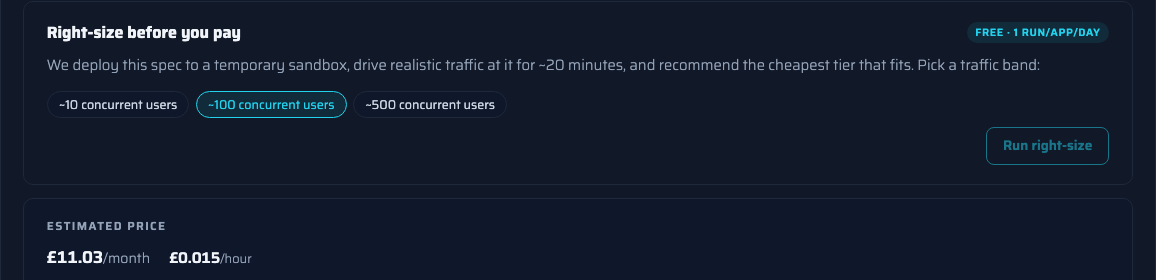
- We drive real traffic at it. You pick a band (~10, ~100 or ~500 concurrent users) and we run a ramp-then-steady load profile against your app for around 20 minutes. No script to write.
- We measure, not estimate. Sustained CPU under load, peak memory, response times and error rate, read from the same monitoring stack that will watch your app in production.
- You get a recommendation with evidence. The deploy form pre-selects the cheapest tier the measurements fit inside, with sensible headroom, along the lines of "at ~100 users: sustained 0.4 vCPU, peak 900 MB → s2, £19.06/month (£0.026/hour)". Deploy at that tier, or override it; it's your call, now an informed one.
Why declared tiers plus measurement beats metered billing
Metered per-second billing sounds fair until the invoice arrives: a traffic spike, a runaway loop or an autoscaler with opinions, and you're explaining a 4× bill to your finance team. Our model is deliberately boring:
- The tier is a contract. Resources are guaranteed at the tier, with burst headroom above it. Your app can't be starved by a noisy neighbour and can't silently expand into a bigger bill.
- The tier is also the cap. Hourly billing at the declared tier and never above it. The only way your bill goes up is you choosing a bigger tier or running more hours.
- The measurement makes it honest. Declared tiers usually mean guessing high "to be safe". The load test removes the guess, which is why we can afford to make it free.
It keeps working after you deploy
Your app's real CPU and memory usage is visible in the portal next to what its tier guarantees, so drift is something you can see, not something you discover on an invoice. Spot it running consistently below its tier? Moving down is one click. We're the platform that would rather tell you to pay less and keep you for years.
Frequently asked questions
What does a right-size run actually do?
We deploy your exact app spec into a temporary, isolated sandbox with generous resource limits, drive a realistic traffic profile at it for around 20 minutes (a ramp up to your chosen level of concurrent users, then a steady period) and measure what it really used: sustained CPU, peak memory, response times and error rate. Then we recommend the cheapest tier those measurements fit inside, with headroom.
How much does it cost?
Nothing. One free run per app per day. It's the feature we'd want as customers, and honestly, it's also the marketing: a platform confident enough to recommend you pay less.
How do I choose the traffic level?
You pick a band rather than writing a load-test script: roughly 10, 100 or 500 concurrent users. That covers the honest range for internal tools, customer-facing apps and busy services. If you know your traffic looks different, deploy at the recommendation and watch the real metrics in your portal.
Can I ignore the recommendation?
Yes. It pre-selects a tier in the deploy form, and you can pick any tier at or above the minimum floor. The recommendation is evidence, not a lock-in. Some teams deliberately go one tier up for headroom; that's a fine choice when it's an informed one.
What are the limits of a 20-minute synthetic test?
It measures how your app behaves under load right now. It won't catch a slow memory leak, a weekly cron spike or a cache that takes days to warm; no short test can, and we'd rather say so than pretend. Your app's real usage is visible in the portal after deploy, so if the tier turns out wrong in either direction, changing it is one click and takes effect at the next billing hour.
Does anyone else do this?
Not that we've found. AWS Compute Optimizer makes sizing recommendations, but only after about two weeks of live production traffic. Commercial ML-based right-sizing products exist for enterprise Kubernetes estates. No container platform we know of load-tests your app before you commit to paying, which is why we built it.
Not sure what your app needs?
Tell us what you're running and an engineer will help you pick a traffic band, read the evidence and choose a tier, before you spend anything.