

Your images, your registry, nobody else's business.
Running your own app starts with somewhere to put the image. Every node.uk workspace includes a private registry project at registry.node.uk: real push credentials for your CI, server-side imports when you don't want to install Docker, vulnerability scanning on every tag, and a storage quota you can see. Free for the first 5 GB.
One screen, everything about your images
The Registry tab in your portal shows every repository and tag with its size, push date and scan verdict, your storage quota, your push credentials and the import form. There is no separate registry UI to learn.
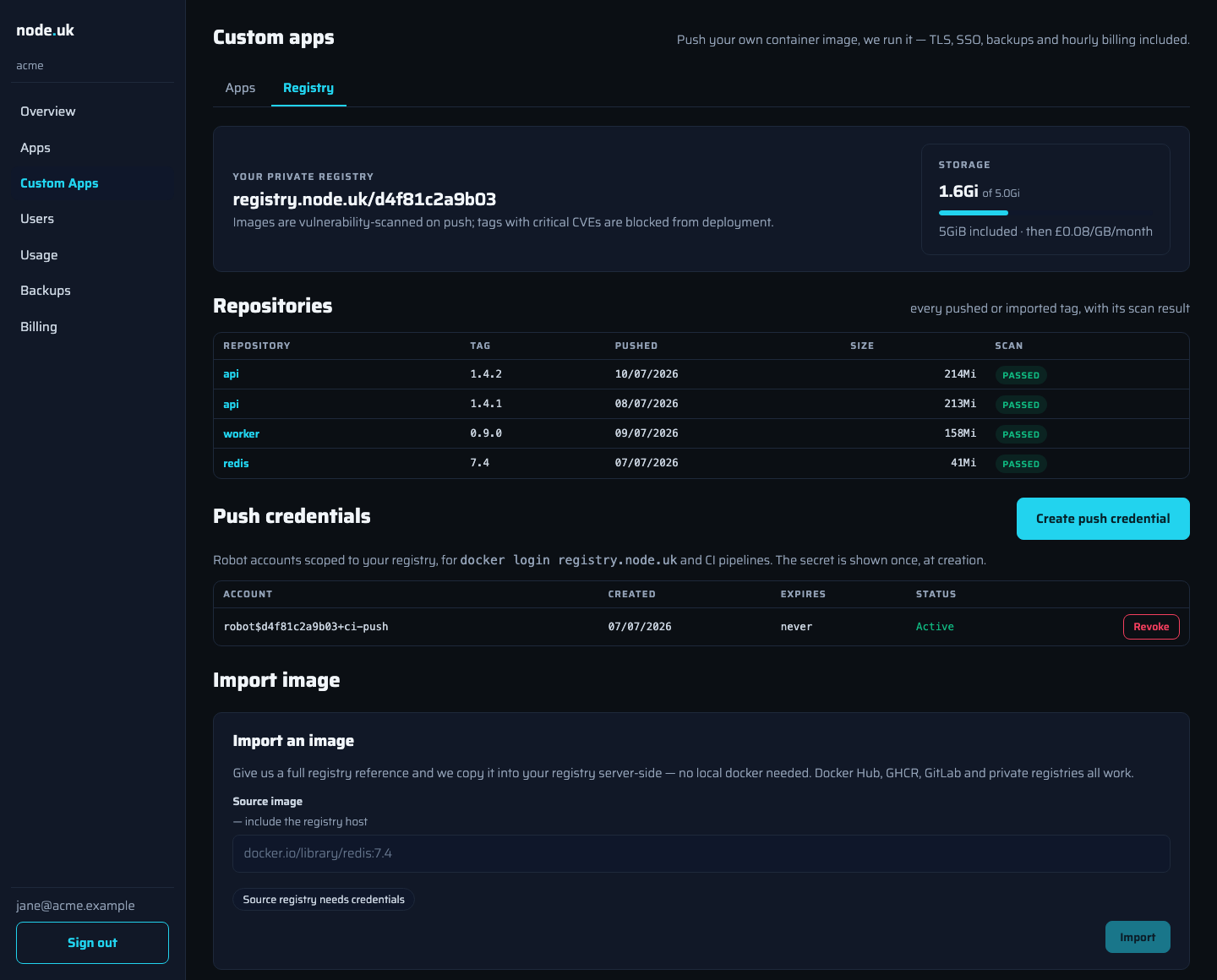
Push it or paste it
Push from anywhere. Create a push credential and the portal hands you the three commands:
docker login registry.node.uk -u 'robot$<your-project>+ci-push'
docker tag myapp:1.0 registry.node.uk/<your-project>/myapp:1.0
docker push registry.node.uk/<your-project>/myapp:1.0
Credentials are registry-scoped robot accounts, not your user password, so they're safe to put in CI, and revoking one kills exactly one pipeline's access, nothing else. The secret is shown once, at creation, and never stored where it can be re-read.
Or let us fetch it. Paste any image reference (Docker Hub, GHCR, GitLab, Quay or a private registry with credentials) and we copy it into your registry server-side. No local Docker, no bandwidth through your laptop, and it works for images too large to push comfortably over a home connection.
Scanned before it can hurt you
Every tag that lands in your registry is vulnerability-scanned automatically. The portal shows the verdict next to each tag, and the rule is simple: critical CVEs block deployment. You can keep the tag, but you can't run it until a patched build lands. It's the difference between a red badge in your registry today and an incident report next quarter.
High and medium findings are shown but don't block: you can judge those trade-offs yourself; we only refuse to run what's critically broken.
Storage you can see
Your quota is on the same screen as everything else: 5 GB included with the workspace, then Standard storage rates (£0.08/GB-month) beyond it. Old tags you delete free the space; there's no per-pull or bandwidth charge for deploying your own images to your own apps.
Frequently asked questions
Is the private registry really included, or is it a paid add-on?
Included, with 5 GB of image storage free per workspace; beyond that you pay Standard storage rates (£0.08/GB-month). Some platforms paywall private registry pulls behind their paid plans; we think a private registry is table stakes for running your own images, so it comes with the workspace.
How do I push an image?
Create a push credential in the portal: it's a registry-scoped robot account, shown once with copy-paste docker login, docker tag and docker push commands. Use it locally or drop it into your CI pipeline. Revoke it any time; anything pushing with a revoked credential stops working immediately.
Can you import an image so I don't need Docker locally?
Yes. Paste a full image reference (docker.io/library/redis:7.4, ghcr.io/org/app:v2, a GitLab or private registry path) with optional pull credentials, and we copy it into your registry server-side. Imports typically finish in a couple of minutes and the tag appears with its scan result.
What does the vulnerability scanning actually check?
Every pushed or imported tag is scanned automatically against known CVE databases. The portal shows the result per tag: passed, or blocked with a count of critical findings. Tags with critical CVEs cannot be deployed until a patched build is pushed. The gate is at the registry, so you find out immediately, not at deploy time.
Who can see my images?
Only your workspace. The registry is partitioned per customer: your images live under your own project (registry.node.uk/your-workspace-id/), credentials are scoped to it, and no other customer can pull from it. Our platform images live in a separate area entirely.
Are my image tags immutable?
Deployed tags are protected from being silently overwritten, so the image you deployed is the image that runs. Push a new tag to ship a new version; the portal redeploys on the new tag when you're ready.
Private container registry on Node
CI integration, migrating images from another registry, or a quota question: an engineer will sort it with you.